
Engineered, not guessed

Systems we design & build

Before anything gets racked or plugged in, it gets designed on paper — every device, every VLAN, every failure point accounted for. Below are the actual reference architectures TCG builds from, broken down piece by piece: what’s in them, why each choice was made, and who they’re for.

Reference design 1
Home & small-office network

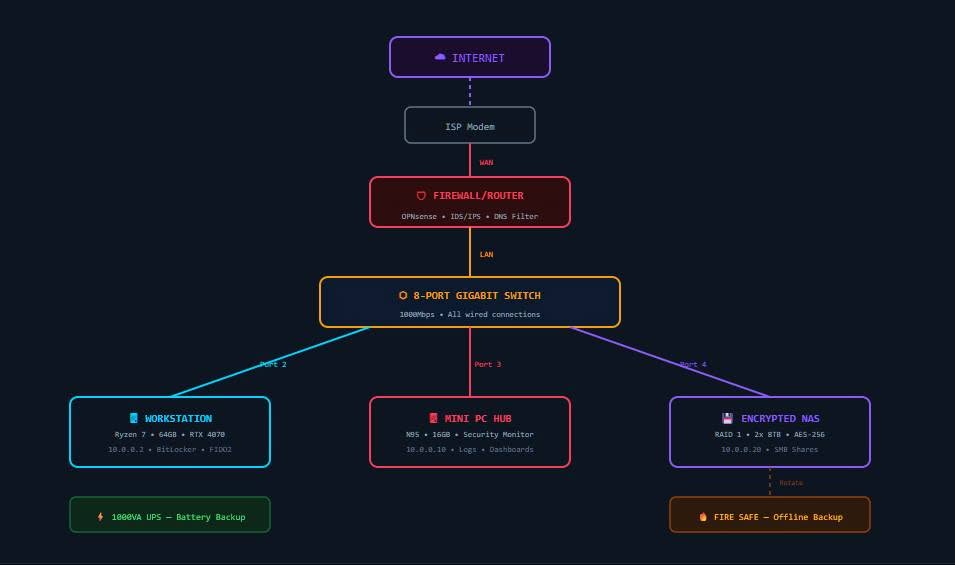
Home network diagram: internet to ISP modem to OPNsense firewall/router to an 8-port gigabit switch, fanning out to a workstation, mini-PC security hub, and encrypted NAS, with a UPS and offline fire-safe backup

This is the baseline every home or small office should have — and the design most people are missing at least half of. It starts simple and gets more capable at every layer without adding complexity you’d have to babysit.

  • OPNsense firewall/router. Sits between the ISP modem and everything else, running real IDS/IPS (intrusion detection/prevention) and DNS filtering — not the NAT-only router your ISP rents you. This is the single control point where malicious traffic gets blocked before it ever reaches a device.
  • 8-port gigabit switch, everything wired. Wi-Fi is for phones and laptops that move around. Anything stationary — the workstation, the NAS, the monitoring box — goes on a wired port: full 1000Mbps, no contention, no dropped packets, and one less thing for a Wi-Fi attacker to target.
  • Workstation, locked down at the disk. Full-disk encryption (BitLocker) plus FIDO2 hardware-key login means a stolen or resold drive is unreadable and a phished password alone can’t get in.
  • Mini-PC security hub. A dedicated low-power box that only watches — logs, dashboards, and alerts. Covered in full detail below.
  • Encrypted NAS, RAID 1. Two drives mirrored with AES-256 encryption at rest. RAID 1 means one drive can die without losing data; encryption means a stolen drive is still worthless without the key. This is shared storage, not a backup by itself.
  • UPS (battery backup). A dirty power event shouldn’t corrupt a database write or crash the NAS mid-sync. The UPS buys clean shutdown time and rides out short outages entirely.
  • Offline backup, rotated. A fire safe holding a drive that gets rotated in and physically disconnected the rest of the time. If ransomware or a house fire takes out everything network-connected, this is the copy that was never reachable to begin with.

Who it’s for: households and single-office setups that want real protection without a rack of gear — this fits on a shelf.

Reference design 2
Business security zones & monitoring

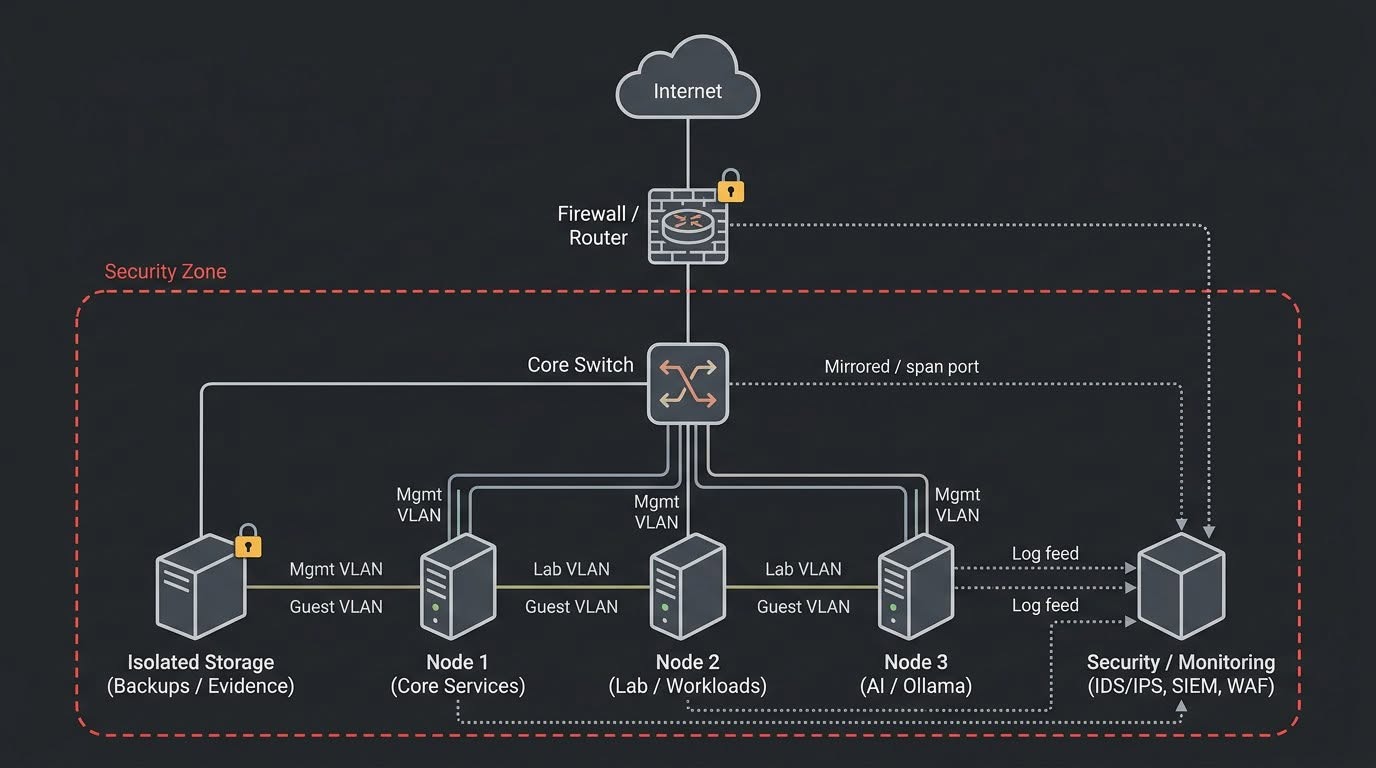
Business security-zone diagram: internet to firewall/router to a core switch with mirrored span port, feeding isolated storage and three VLAN-segmented nodes (core services, lab/workloads, and an AI/Ollama node) into a dedicated security/monitoring box running IDS/IPS, SIEM, and WAF

A flat business network is one compromised laptop away from a full breach. This design assumes that eventually, something will get infected or misbehave — and makes sure that when it does, it can’t reach everything else.

  • VLAN segmentation, per device. Every node carries its own management, "lab/workload," and guest VLANs — core services, lab/workload machines, and the AI/Ollama node are each fenced off from the others at the switch level. A compromised lab box can’t quietly reach payroll or backups.
  • Firewall with IDS/IPS at the perimeter. Same principle as the home design, scaled up: everything inbound and outbound is inspected, and known-bad traffic patterns get blocked automatically, not just logged after the fact.
  • Mirrored (span) port to a dedicated monitoring box. The core switch copies a duplicate of all traffic to a security/monitoring appliance running IDS/IPS, a SIEM (security information and event management), and a WAF (web-application firewall). It sees everything without being in the traffic’s direct path — no way to bring it down and blind the monitoring.
  • Isolated storage for backups and evidence. Kept on its own VLAN, access-controlled and separate from production systems. If something is ever compromised, this is also the untouched copy an investigation needs — which is why it’s labeled "Backups / Evidence," not just "Backups."
  • The AI/Ollama node, segmented like everything else. Local AI workloads get the same isolation as any other node — no special trust just because it’s the newest piece of the stack.
  • Centralized log feed. Every node and the firewall itself streams logs to the security box, so an incident on any one machine is visible in one place instead of scattered across servers nobody’s watching.

Who it’s for: small businesses running more than a handful of devices, anyone touching client data, or anyone running AI/automation workloads alongside day-to-day operations.

Reference design 3
Low-power monitoring hub

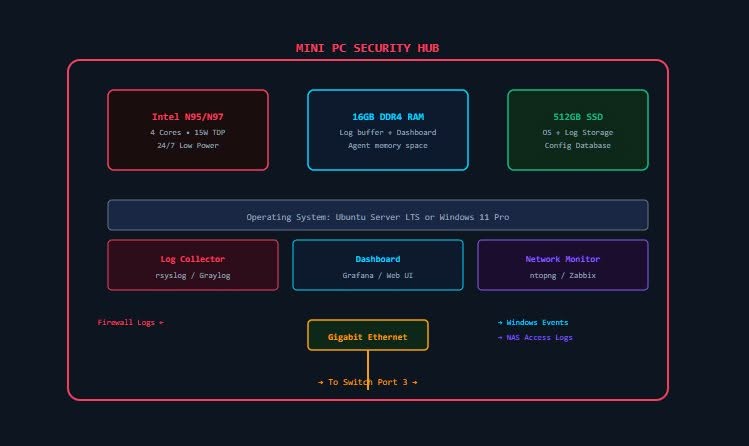
Mini-PC security hub diagram: Intel N95/N97 4-core 15W CPU, 16GB DDR4 RAM, and a 512GB SSD running Ubuntu Server LTS or Windows 11 Pro, hosting a log collector, dashboard, and network monitor, connected over gigabit Ethernet to the core switch

You don’t need a rack or a power bill to match to get real visibility into a network. This is the box both reference designs above lean on for logging and monitoring — sized to run 24/7 for pocket change in electricity.

  • Intel N95/N97, 4 cores, 15W TDP. Enough compute for log ingestion and dashboards, low enough power draw to leave running around the clock without it showing up on the electric bill.
  • 16GB DDR4 RAM. Headroom for the log-collector buffer and dashboard agents to run simultaneously without swapping — the usual failure mode on underpowered monitoring boxes.
  • 512GB SSD. OS, log storage, and the configuration database all live here — enough retention to look back weeks, not just hours, when something needs investigating.
  • Ubuntu Server LTS or Windows 11 Pro. Whichever matches the environment it’s monitoring — no forcing Linux tooling onto an all-Windows shop or vice versa.
  • Log collector (rsyslog / Graylog). Pulls in firewall logs, Windows event logs, and NAS access logs into one searchable place instead of four different consoles.
  • Dashboard (Grafana / web UI). A live, glanceable view of what’s actually happening on the network — not just raw log lines nobody has time to read.
  • Network monitor (ntopng / Zabbix). Watches bandwidth, device availability, and traffic patterns, so a saturated link or a dead device gets noticed in minutes, not weeks.

Who it’s for: anyone from the home-network design up to the full business security zone — it’s the same building block at every scale.

How we work

Our build philosophy

📝

Documented, not tribal knowledge

Every network gets a real diagram, IP plan, and device list — like the ones on this page — so it can be handed to someone else and understood in minutes, not reverse-engineered.

🔧

Maintainable over clever

Boring, well-supported hardware and software beat a fragile "clever" setup every time. If it can’t be fixed at 11pm by reading the diagram, it doesn’t ship.

💬

Honest about trade-offs

Every design decision — a cheaper switch, a smaller NAS, skipping a UPS — gets explained plainly, including what you’re giving up, so it’s your informed call, not a hidden one.

Want something like this planned for your home or business?

Every network is different — we’ll design yours around what you actually have and actually need, explained in plain English, with a diagram like the ones above when we’re done.